Close Store
Table of Contents
Download
You can purchase and download this extension at the Opencart Extension Store
A full list of my extensions is availble here: Opencart Market Place
Overview
This extension allows you to only close the checkout of your store. This allows all store features to be used while you are not taking orders and allows search engines to keep indexing your store.
REMEMBER TO BACKUP YOUR FILES BEFORE MAKING ANY CHANGES
If using Opencart 3.x then I recommend installing this extension - Modification Manager - or similar as if you have any issues with the your theme or template then making alterations to extension is faster and easier.
New Installation - Opencart 3.
- Go to Admin -> Extensions -> Installer and upload the
close_store_1.5.2_oc3.x.ocmod.zip file. - Go to Admin -> Extensions -> Modifications and click
Refresh to refresh the modification cache (top right). - Go to Admin -> System -> Users -> User Groups
- Edit your admin user group and check access and modify boxes for:
extension/module/close_storeextension/vger/close_store - Go to Admin -> Extensions -> Extensions
- Select Modules and install the Close Store module
- Now setup and configure the extension, see below
New Installation up to Opencart 2.3.x (vQmod)
- Before installation make sure you have already installed the latest vQmod.
- Upload the contents of the /upload folder for the version of Opencart that you use.
- Login to your admin and go to System > Users > User Groups
- Edit your Admin user group and add Access and Modify permissions for :
extension/module/close_storecatalog/close_store - Go to Extentions > Modules and install the Close Store module.
- Now setup and configure the extension, see below:
Settings
Schedule:
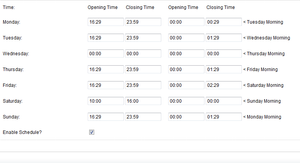
This dual schedule is designed primarily for stores opening past midnight but you can use it have a split day (morning/afternoon) as well by using the right hand colum for your morning times and the left hand column for your afternoons.The schedule is quite complicated if you have some odd times - I wrote it and even I have trouble sometimes with setting up the scheule. If you can't manage to set the schedule up yourself then please use the support form and provide the times you need.
As an example to get you going, the following schedule represents store opening times of:
| Monday | 16:30 - 00:30 |
| Tuesday | 16:30 - 01:30 |
| Wednesday | Closed All Day |
| Thursday | 16:30 - 01:30 |
| Friday | 16:30 - 02:30 |
| Saturday | 10:00 - 16:00 |
| Sunday | 16:30 - 01:30 |
Force Checkout Closed
To quickly cose the store simply tick the Force Checkout Closed? check box. This overrides ALL other settings and forces the chekout to close.
Timezone
Certainly most servers are set to the wrong time or your server is in a different country. Use this box to enter the PHP timezone of where you are to correct the time. Further instructions can be found on the Close Store page.
Daily Times
If your store is open the same hours 7 days a week then you can use the Daily Times setting instead of the schedule.
Holidays
Holiday sections allows you to enter the dates for periods when the store is closed, like if you go on holiday, or set holidays like Christmas or Easter etc. Up to 10 holidays can be set and the store will close on and between the dates set. Holidays override all other time and date settings.
Information:
The Close Store form is fully validated to try and make sure that you can't make any incorrect settings, but please also read the guidance notes on the form which explain what you can and can't do and double check all your entries.
You should also test that is is opening and closing at it should.
Uninstall
Opencart 3.x
- Go to Extensions -> Modules
- Uninstall the Close Store Module
This will remove all the settings from the database. - Go to Extension -> Installer and uninstall the store_closed_1.5.2.ocmod.zip entry
This will remove the files from your server. - Go to Extensions -> Modifications and click on the refresh button.
Opencart upto 2.3.x (vQmod)
- Go to Extensions -> Modules
- Uninstall the Close Store Module
This will remove all the settings from the database and the files from your server.
Known Issues
This will not work by default on 3rd party checkouts (i.e. One Page Checkouts)
Support
For help and support please use the email form Email Support Form
If something has gone wrong or you need support then please include as much information as possible and a full description of the problem. If you send me an email that just says 'it's not working', support is going to take a lot longer as I'm going to have to start asking lots of questions.... the more information I have the quicker I can solve any problems.